The Little Mule: A
Legacy PC
I found on local
classifieds one day an Asus MOBO with an included core 2 duo CPU.
The guy wanted 20 bucks. So I met up with him and bought it. After
accumulation of a few more parts I took it to a friend's and we did a
system re-build for his old PC. I took all his old hardware in
exchange for the new hardware. I didn't originally plan this, it
just came to me when I realized that I really did NEED another Core 2
Duo PC... seeing as how I was currently working one 2. So I set him
up with a nice PC. Stripped out all the old, plugged in all the new.
I forget the actual stats, but its a core 2 duo, a 2.8 ghz I believe
with at least 3 GB of ram (DDR2) probably around the 600MHz speed.
And a Geforce 9800 512mb Video Card. When all was said and done he
was running Black Mesa on medium to high settings. Which was really
our goal when we started because Half-Life, to us, is lesson number
one in a proper video game appreciation course.


His old hardware sat
in my bin-o-parts for several months. The core I3 I did for my wife
came out of this stupid old case that I started off hating. I nearly
tossed it out at one point. Then I figured “what the heck, I can
have a full running computer with these parts, why not?” and I
began a build for a Legacy PC. I figured having an old PC around
would be great so I could play my old favorite PC games again.
I got everything
into the case and running and was nostalgic when windows XP booted
up. (I happened to find an authentic copy of WinXP too!) One of the
things I tried with it was windows 95 (because I also have an
authentic copy of that old crap!) and I attempted to play Daggerfall.
I can't say it was a success because the game was all glitchy and
unplayable, but it wasn't a failure either because the game
installed, loaded, and ran. You just couldn't kill the first bat
thing you came across because it thought the attack button was the
pickpocket button. Anyway, I scrapped the idea and went to XP
thinking that DOSBOX or legacy mode would play it better. (I
actually haven't even tried it yet... I got a bit distracted)

I hated how long
boot time was, and how so much junk loaded at startup and the general
sluggishness of the PC so I found online a link:
https://law.wustl.edu/computersupport/help/Instructions/Optimize%20WinXP/How%20to%20optimize%20Windows%20XP%20for%20the%20best%20performance.htm
and I went through it. Now my PC looks like windows 95 but it runs
like a champ! Boot time was reduced, and applications loaded faster,
general PC usage and navigation was faster and smoother. I couldn't
care less about all the fancy “upgraded” looks of XP so
optimization for speed was just the ticket.


I use SpeedFan and OpenHardwareMonitor to veiw the status of my PC's hardware and to find any problems, or potential problems. For example, my HDD was running almost twice as hot as my CPU. I was able to set the perfect fan speed for the CPU's cooler so that I get good performance without too much noise. The temps in the case were also unreasonably high. I decided that some case modding was in order as well as something had to be done about that HDD.
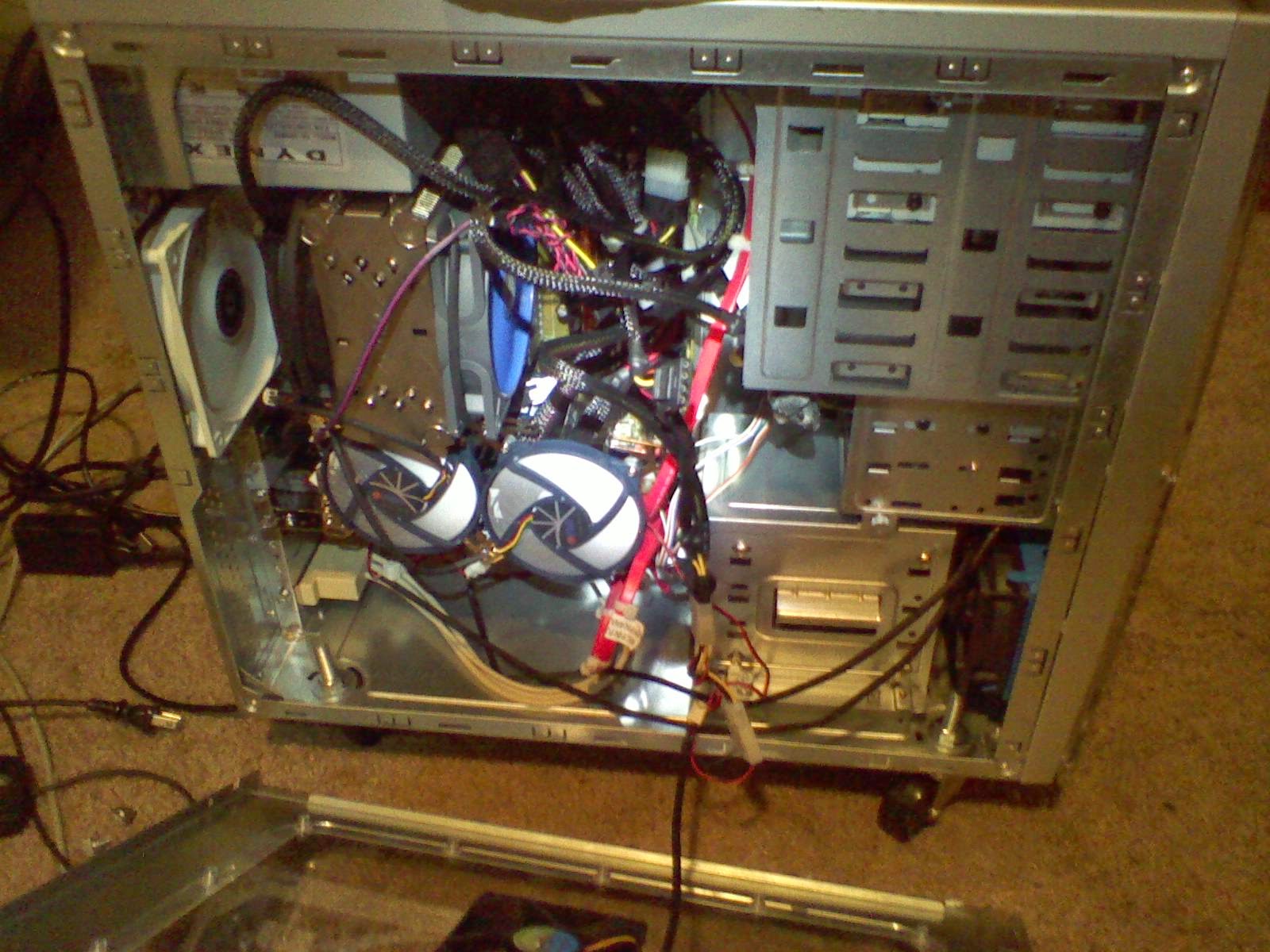
The front of the
case had little tiny vent holes. Pathetic. I drilled them out
bigger! Now it can actually intake! Then I pasted and zip-tied a
heatsink onto the biggest chip on the HDD. That dropped it's temp by
a few degrees. Then I popped out the bay cover for the slot above
and it dropped another few degrees. I found a little fan from an old
Pentium 3 cooler and rigged it up to blow over the HDD, the temps
dropped even further. Feeling empowered with air cooling brilliance
I thermal pasted an old CPU cooler onto the top of the HDD and
fastened it down with a zip tie and found another P3 cooler fan from
another stack of old computers I was given and drilled some more vent
holes for good measure. I had to move the restart button and
eliminate one of the front panel LEDs but I don't need that bizz
anyway. That HDD became the coolest componenent in the entire case!
Feeling satisfied with the air cooling performance I began using the
PC for all sorts of things. I play old games, I have my library of
E-books on here, when I do data recovery for the people who give me
their old PC's I use this computer and burn their data on to CDs or
DVDs with it. It will pop out a full Data DVD in about 7 minutes.
I'mm sure new and faster machines could do it much faster but I am
very satisfied with this old tech doing everything I need it to do.

 In fact the PC I put
together for my wife was doing this weird thing where it would
constantly freeze for several seconds. It made it nearly impossible
to do anything on. You'd move the mouse toword where you want to
click and it would freeze. A moment later it would be back and you'd
lost your cursor, typing was unreal because you never knew if it was
keeping up with you. I did some research and decided I had better
check the HDD. Sure enough, after a ScanDisk I found a bunch of bad
sectors. I got a new hard drive order. Then I tried to repair that
HDD. My wife's laptop, a fairlew Toshiba with 8.1 wouldn't format
it. My older Toshiba laptop with Ubuntu wouldn't format it. I
couldn't even get the windows 7 install disk to format it and when
trying to start fresh! So as a last effort I hooked it up via USB
adapter to this old PC. It was formatted in a couple hours and had
zero bad sectors! By now the new HDD and arrived and I got the
wife's PC up and running again, but now I have a spare HDD for it or
one of my other projects. From then on I named this PC the Little
Mule. It may not do it fast, but it get's it done. This old thing
has been able to handle everything I've thrown at it.
In fact the PC I put
together for my wife was doing this weird thing where it would
constantly freeze for several seconds. It made it nearly impossible
to do anything on. You'd move the mouse toword where you want to
click and it would freeze. A moment later it would be back and you'd
lost your cursor, typing was unreal because you never knew if it was
keeping up with you. I did some research and decided I had better
check the HDD. Sure enough, after a ScanDisk I found a bunch of bad
sectors. I got a new hard drive order. Then I tried to repair that
HDD. My wife's laptop, a fairlew Toshiba with 8.1 wouldn't format
it. My older Toshiba laptop with Ubuntu wouldn't format it. I
couldn't even get the windows 7 install disk to format it and when
trying to start fresh! So as a last effort I hooked it up via USB
adapter to this old PC. It was formatted in a couple hours and had
zero bad sectors! By now the new HDD and arrived and I got the
wife's PC up and running again, but now I have a spare HDD for it or
one of my other projects. From then on I named this PC the Little
Mule. It may not do it fast, but it get's it done. This old thing
has been able to handle everything I've thrown at it.
 So when I installed
XP on the Lil' Mule I did it
So when I installed
XP on the Lil' Mule I did it  next to Ubuntu on the same HDD. I made
a 3rd partition on the same same Hard drive with the idea
that I would try other Linux versions there. So my XP partition
quikly ran out of space with me loading old PC games and tons of
e-books, and when doing Data recoveries for people I would move the
wanted date to my PC's hard drive prior to burning onto disks so I
wanted to keep enough space free for those sorts of things. XP can't
recognize the other partitions on that HDD so I needed a second one.
With all that mess set up for the first HDD I hate to get a bay
adapter for the second one to mount up in a 5.25” drive bay and it
turned out that the ribbon cable was a few inches too short to reach.
It was about then I decided to max this thing out. I got on amazon
and ebay and had 3 Gbs of 400mhz ram on it's way with a ribbon cable
extention in no time, and shortly after that I had a 512 Video card
on it's way with the fastest CPU AMD made for socket A, the Athlon XP
3200+. (go ebay! ) Currently, the ram is installed and the second
HDD is up and running, I formatted it this morning. I have several
spare PATA 80GB HDD's so I didn't have to buy an old HDD.
next to Ubuntu on the same HDD. I made
a 3rd partition on the same same Hard drive with the idea
that I would try other Linux versions there. So my XP partition
quikly ran out of space with me loading old PC games and tons of
e-books, and when doing Data recoveries for people I would move the
wanted date to my PC's hard drive prior to burning onto disks so I
wanted to keep enough space free for those sorts of things. XP can't
recognize the other partitions on that HDD so I needed a second one.
With all that mess set up for the first HDD I hate to get a bay
adapter for the second one to mount up in a 5.25” drive bay and it
turned out that the ribbon cable was a few inches too short to reach.
It was about then I decided to max this thing out. I got on amazon
and ebay and had 3 Gbs of 400mhz ram on it's way with a ribbon cable
extention in no time, and shortly after that I had a 512 Video card
on it's way with the fastest CPU AMD made for socket A, the Athlon XP
3200+. (go ebay! ) Currently, the ram is installed and the second
HDD is up and running, I formatted it this morning. I have several
spare PATA 80GB HDD's so I didn't have to buy an old HDD. So, Starting specs
were:
So, Starting specs
were:
CPU: AMD Athlon XP
2100 @1.1Ghz
1.5GB RAM @400mhz
GPU: Radeon 9800
256mb
350W PSU
HDD 120GB @7200rpm
ROM1 DVD RW/CD RW
ROM2 CD RW
3.5” Floppy

Now they will be:
MOBO: Asus A7N8 2.0
CPU: AMD Athlon XP 3200 + @2.2Ghz
3GB RAM @400mhz
GPU: Radeon x1550 XGE 512mb
350W PSU
HDD1 120GB @7200rpm
ROM1 DVD RW/CD RW
ROM2 CD RW
3.5” Floppy
I want a more
powerfull PSU with more power rails, a fan controller, and a 5.25”
drive bay fan module to cool the second HDD. So it's still a work in
progress but it's my little mule!